Getting Great Drums with the Drummer Track
Add a virtual session drummer, choose a style and kit, and shape the performance's intensity and complexity without programming a single hit by hand.
You don't need to be a drummer, or even own a MIDI keyboard, to get realistic, musical drums in GarageBand. The Drummer track handles the performance. You just direct it.
Adding a Drummer track
Add a new track and choose Drummer. GarageBand presents a grid of drummer characters, each tied to a musical genre and playing style: rock, pop, electronic, songwriter, and more. Pick whichever fits your song; you can always switch it later without losing your edits.
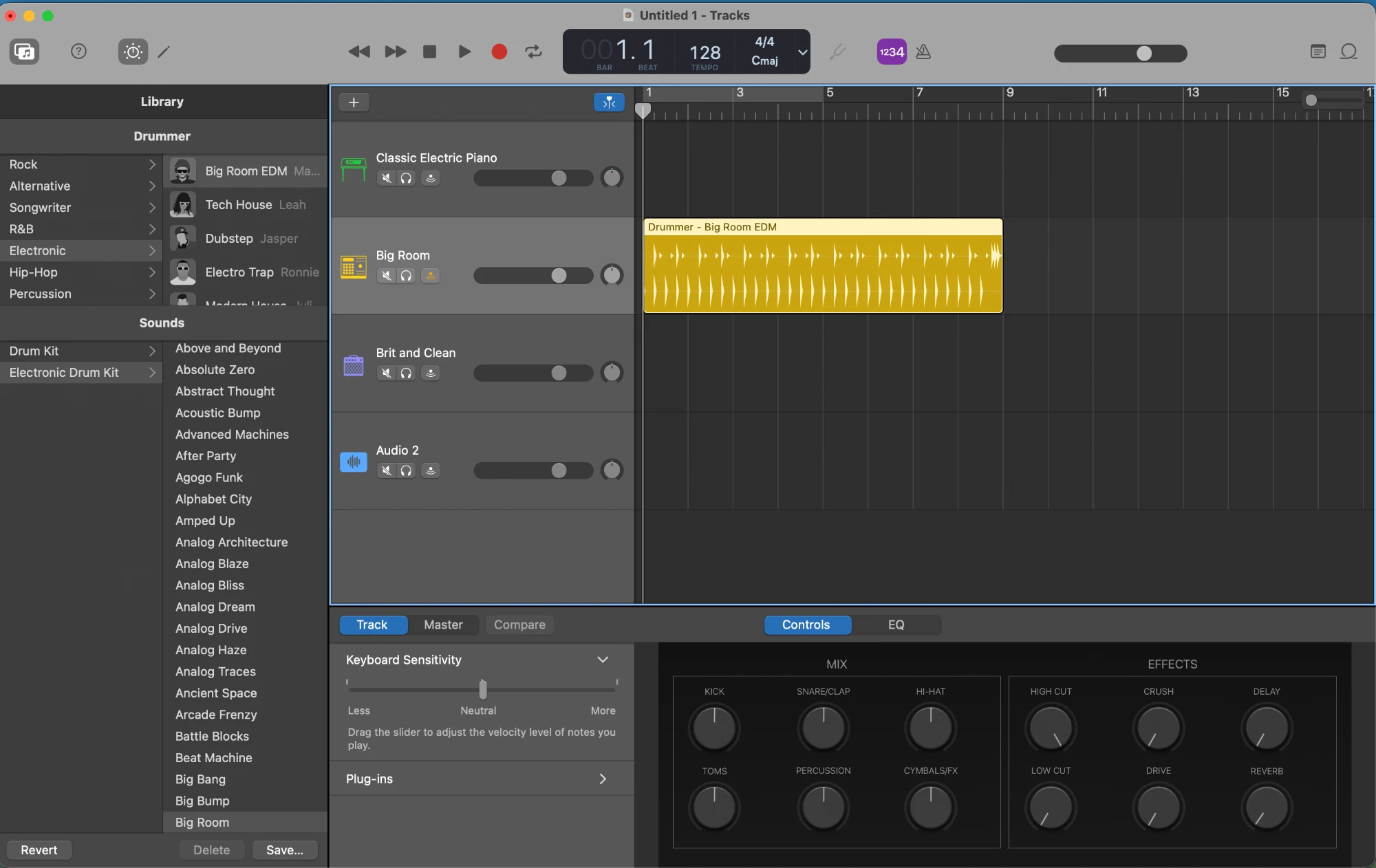 Drummers are grouped by genre in the Library on the left. Below, the Mix
and Effects knobs shape the kit's individual pieces once you've picked one.
Drummers are grouped by genre in the Library on the left. Below, the Mix
and Effects knobs shape the kit's individual pieces once you've picked one.
Choosing a kit and style
Once a drummer is selected, the Smart Controls panel below shows:
- A kit picker, to choose the actual drum sounds (acoustic, vintage, electronic, etc.)
- Preset patterns or a genre-specific set of grooves to start from
- Sliders for complexity (how busy the pattern is) and loudness/intensity
Start with a preset close to what you imagine, then nudge the sliders rather than starting from scratch: small adjustments go a long way.
Fills and dynamics
Drummer tracks usually include a Fill control, letting you mark specific bars (like the end of a verse) where the drummer plays a transition fill instead of the steady groove. This is what keeps a Drummer track from sounding robotic across a full song: use fills sparingly, right where a section changes.
Editing the performance
If you want more control than the sliders give you, most Drummer regions can be converted into a fully editable MIDI performance you can open in the Piano Roll editor (covered in the Intermediate track), letting you manually adjust or mute individual hits, like a snare or hi-hat, exactly like any other Software Instrument track.
Building a full drum arrangement
A song rarely uses one static drum pattern the whole way through. A simple structure:
- Quieter, sparser pattern for verses (lower complexity, maybe drop the kick)
- Fuller pattern for choruses (higher complexity and intensity)
- A fill at each transition between sections
You can set different complexity/intensity values on different regions of the same Drummer track, so the performance evolves with your song instead of looping identically from start to finish.
Later on, once you're comfortable with the Arrangement track (covered in the Intermediate lessons), you can label your song's sections and have the Drummer follow them automatically: playing a sparser pattern in verses and a fuller one in choruses without you manually placing each region. For now, manually varying Drummer regions like above gets you the same result.
What's next
With loops and drums covered, it's time to zoom out and look at the whole project together. The next lesson covers basic mixing: getting every track's volume and stereo position sitting well against each other.
Finished this lesson?